IAW

iaw-white-logo iosandweb technologies
Categories
Blog

SaaS Web Application Development: Cost, Process, Features & Benefits in 2026

It goes without saying that companies are progressively replacing on-premise/desktop solutions with the flexibility that web-centric access has offered to their employees across geographies.

 Hence, it is imperative to invest in SaaS web application development for one’s resources in tech, startups, or enterprise-scale applications or solutions.

Today, anything from CRM and accounting systems to project management solutions or even AI-driven services is likely to operate via a SaaS model, enabling companies to ship software over the net and without relying on users to install or deal with hardware themselves.

When designed with subscriptions in mind, a SaaS product can serve as another stream of recurring revenue. But creating the ideal SaaS solution takes more than just a web application – it takes the right infrastructure, UX and security, and an ongoing development plan.

What Is SaaS Web Application Development?

SaaS Web Application Development: Web-based application development is a process of building software that is accessed using the internet. In essence, it means the software is not downloaded/installed on personal devices. 

It’s typically done based on a model called SaaS (Software as a Service), where customers will usually buy a plan, and the developers of that software will maintain and host such apps for all their customers. This makes SaaS the most popular form of subscription-based software that we use all over the internet – offering clients easy, on-the-go access to programmes without the hassle and upkeep of the technical requirements that come with it.

Usually developed as a cloud-hosted application. May employ multitenant architecture. Multiple customers may use a single application simultaneously while maintaining separate (logical) data for each. 

The vendor can more easily host the product and serve all clients by leveraging such architecture. Typically SaaS applications are developed with the use of cloud-hosted services and multi-tenant architecture, enabling several tenants or customers to share access and use of one instance of the software and its underlying infrastructure.

SaaS Application Development Process

Familiarize yourself with the SaaS development process before building the product. The development of the SaaS product may differ from case to case, but a typical SaaS development process can be represented by:

1. Business and requirements analysis: A team defines the users of the product, the business goals, the problem it addresses, the features of the product, the relevant stakeholders (user roles), and how the business earns money. 

2. UI/UX design: A designer translates the idea into a logical, easy-to-understand, and easy-to-use application. 

3. Technology stack and architecture design: It defines which frontend, backend, database, APIs, and cloud the system uses.

This must happen from the beginning, not as an add-on to handle a bigger scale/ security, for instance.

4. Development: A team implements the product with all the features such as authentication, dashboards, workflows, payment module, external connections, and so on. 

5. Testing and Security: A system is tested for functional issues, performance, compatibility with browsers or other factors, and security measures before it’s put live. Data security must also be addressed during development. 

6. Release and Continuous Improvement: Once the system goes live, it is monitored, patched, and updated, and new features are developed. 

So businesses seeking an answer to “how to create a Saas web application” should aim to solve one particular problem for their customer before thinking about the tech stack required to do that.

Key Features of a SaaS Platform

The features of a SaaS product depend on its purpose and target audience, but several capabilities are commonly required:

  • Secure registration, login, and authentication
  • User roles and permission management
  • Personalized dashboards
  • Subscription management and billing
  • Payment gateway integration
  • API integration with third-party services
  • Analytics and reporting
  • Notifications and automated workflows
  • Data backup and recovery
  • Scalable database architecture
  • Strong data security
  • Admin management tools

Having these features will convert your basic web app into a proven and dependable SaaS platform that will give you support for many clients and also be able to sustain many business flows.

SaaS Web Application Development Cost in 2026

The cost of development varies significantly according to the complexities of a SaaS web application. There is not a “one-fits-all” price for developing a SaaS application.

The overall price may rely on: the number and complexity of the application’s functionalities, the UI and UX complexities, the tech stack used, the level of integration, the security measures required, the cloud services utilized, the development team appointed, how it is tested, and the necessary maintenance.

If you are trying to gauge what developing a SaaS application costs, then it is wise to first develop an MVP of the application with a minimal set of functionalities. This gives a definitive brief for your development team, and they can supply you with a viable estimate. Advanced analytics, AI functionalities, complex integrations, automations or enterprise-level security can obviously affect development time and the final price significantly.

Benefits of Custom SaaS Development

Advantages Custom SaaS Development The beauty of custom SaaS software is the fact you develop your software to your own processes, instead of trying to make the existing process fit to software out of the box. 

Custom SaaS provides the opportunity to have much more control over customisation, integrations and data. Control over functionality and security are more inherent in this approach.

Other benefits include:

  • Scalability: A good application must support the increase of the number of its users and the data handled by it. 
  • Accessibility: This software is usable via any Internet device. 
  • Recurring revenue: Subscription software offers potential for a recurring revenue stream. 
  • Centralized updates: Improvements can be deployed without requiring every user to install a new version.
  • Integration flexibility: APIs allow the SaaS product to connect with existing business tools.
  • Better customization: Features can be designed around specific customer and business requirements

Choosing SaaS Development Services

Selecting the right company for SaaS development is important to the overall project.

Reliable SaaS development companies tend to be equipped with good technical knowledge and experience regarding SAAS products, together with clearly defining the issues of security, scaling, and support.

Businesses can easily outsource their product development, cloud, security and integration needs as well as maintenance from professional SaaS development providers.

The company that should do the evaluation based on the working of the outsourcing partner should evaluate the following points, such as the experience of the company and technical ability, the working of the company, the company’s information security measures, the communication protocol of the company and its overall practice of integrating information, the past practice of making solutions into SaaS mode and the last one on the commitment of the ongoing support.

Apart from technical skills—coding and architecture—a reliable provider needs to know how to align business goals with product architecture, user interface, security, scalability, and metrics that reflect product success or failures. 

Whether it is a full-scale SaaS development service or just skilled developers, finding the right SaaS development partner will improve the overall reduction of technical risks and support long-term product evolution.

Why SaaS Web Development Matters in 2026

Contemporary products of SaaS type should be reliable in terms of security, convenient in terms of simplicity in usage, quick in execution, and also adaptable to the customer requirements evolution over time. Excellent SaaS web development should be defined as the combination of engineering excellence and a business strategy to make the products ready for any upcoming evolution. 

A software development company might be an alternative option, either when your organization requires vast engineering competence in general or an AI Software Development Company, in case you’re considering implementation of features such as AI Assistants, Intelligent Automation, Predictive analytics, and Generative AI. Eventually successful SaaS development means not only releasing the software in question, but delivering a trusty and predictable solution to a specific client’s needs, maintaining ongoing value, with the capacity to grow over time.

FAQs

1. What is SaaS web application development?

SaaS web application development creates cloud-based software that users access online through a subscription. It is also known as software as a Service.

2. How much does SaaS web application development cost?

The SaaS web application development cost depends on features, complexity, technology, integrations, and security. An MVP usually costs less than a feature-rich SaaS platform.

3. How long does it take to build a SaaS application?

The time for SaaS application development depends on the project’s features and complexity. A basic MVP can take a few months, while larger platforms may take longer.

4. What technologies are used for SaaS web application development?

SaaS web development commonly uses React, Angular, Node.js, Python, Java, databases, APIs, and cloud infrastructure based on project requirements.

5. Why should businesses choose custom SaaS development?

Custom SaaS development lets businesses build software around their specific needs while improving scalability, integrations, flexibility, and data security.
Categories
Blog

AI Automation for Businesses: Benefits, Use Cases & Future Trends

AI automation has quickly evolved beyond a buzzword into a practical addition to everyday business. Businesses are rapidly adopting AI for the purpose of automating mundane and repetitive tasks, improving employee productivity, rendering Personalized Customer experiences, and enabling faster decisions.

Enterprises’ automation priorities have rapidly changed away from rules-based automation to intelligent automation encompassing context awareness, the ability to integrate business data, decision-making capability, and the ability to execute multi-task automation.

Agentic AI, multi-agent workflows, multimodal AI, voice automation, and AI-powered workflow automation are some of the most important business automation trends that we can see.

The flip side of automation expansion is the new focus by many enterprises on governance, data privacy, and human oversight and on demonstrating value delivered by AI in real-world operations, not just experiments.


AI automation solutions for businesses involve the integration of artificial intelligence and workflow automation so tasks can be done with minimal human intervention.


In contrast to classical automation approaches, which focus predominantly on predefined rules, the development of intelligent AI-based automation systems allows for handling information of various forms, discerning patterns, interpreting context, and learning how to interact under different circumstances.

What Is AI Automation for Businesses?

AI automation involves leveraging tools like artificial intelligence, AI agents, workflow automation, and machine learning to optimize business activities. This approach, often referred to as AI business automation, helps organizations connect applications, process data, execute actions, and support employees across different departments.

Businesses can also use specialized AI automation services to identify suitable workflows, integrate AI tools, and build scalable automation systems based on their operational requirements.

It can orchestrate data between various applications and systems, perform data processing tasks, execute actions in an automated fashion, and even assist your workforce throughout your entire organization.
Realistically, what you are likely to use it for would be having an automated email service that either directly resolves a customer’s request (extracting data from email, writing a response, etc.), updates records in CRM, or escalates to a human agent if needed.

AI automation is becoming core in digital transformation because of its ability to significantly boost productivity. Modern-day automated business solutions are built around full workflows now, not just automated processes.

Benefits of AI Automation for Businesses

The potential to be more productive is one of the biggest advantages of AI automation for the business.

Workflows that have always depended upon individual, time-consuming human effort can be taken over by automated systems, enabling the business person to allocate more time towards planning, thinking creatively, and making decisions on the business and handling the clients.

Other important benefits include:

  • Higher productivity: AI can handle repetitive administrative activities continuously.
  • Faster operations: Automated workflows can reduce delays between different business processes.
  • Lower operational costs: Businesses can reduce the amount of manual effort required for routine work.
  • Better customer experiences: AI can provide faster and more personalized support.
  • Improved accuracy: Automated systems can reduce errors associated with repetitive data entry and processing.
  • Scalability: Companies can handle increasing workloads without increasing manual processes at the same rate.

The value is increasingly measured by business outcomes rather than simply the amount of work automated. This becomes especially important for businesses as they move AI projects from the pilot to the production stage.

How AI Automation Helps Businesses: Key Use Cases

Businesses can apply AI workflow automation across almost every department.

1. Customer Support Automation

With AI automation for customer support, repetitive customer questions (FAQs), can be automatically answered, customer queries can be intelligently categorised, conversations between customer and agent can be summarized,nd support agents are guided to provide an efficient answer, or escalations may be escalated to an actual support agent in case of complicated issues.

This customer support automation helps businesses respond faster while allowing support teams to focus on complex customer issues that require human judgment. 

Increasingly sophisticated modern AI chatbots are evolving to include what we can think of as an AI agent capable of actually doing things in addition to just writing an answer. Agentic AI in service is a big topic in customer service today. 

This is because, according to Salesforce, service leaders identified an investment in an AI agent as their top priority, while organizations also indicate it as the way they will make improvements to customer-service costs and speed.

2. Sales and Lead Management

AI may be programmed to score and qualify leads automatically, populate CRM fields, set up follow-up appointments, provide a summary of sales calls, and identify good prospects.

AI automation for sales and marketing combines sales automation with marketing workflows to automate manual qualification and follow-up processes, freeing sales and marketing teams to focus on qualified prospects and strategic customer relationships. 

Across India , AI agents are already being deployed from an experiment into a sales process function.

3. Marketing Automation

These AI systems can also observe customer behaviour, tailor content, segment data into audience groups, automate workflows, and adapt to varying customer behaviour over time, leading to more data-driven marketing automation. 

4. Business Process Automation

BPA offers many applications, from processing invoices to onboarding new employees, analyzing documents to providing reports, linking up various applications and eliminating most manual handover. 

Companies can start by looking for mundane tasks that will be able to be standardized and then gradually introduced with AI where the business need is of reasoning, forecasting, prediction, etc. 

Through process standardization, businesses can identify areas for process optimization by taking a critical look at where the main bottlenecks are and improving workflows accordingly. 

How to Automate Business Processes With AI 

A pragmatic start: Begin with a high-volume process with tangible business value. Define the business processes, note where repetitive tasks exist, how business systems are interrelated, and determine where human review is necessary. If the workflow requires even more complex, step-based actions, agents can perform the plans and execute based on the planned tasks.

Google Cloud sees these agentic workflows as another key trend for 2026, as more agents can coordinate multiple activities across business processes.

As AI goes deeper into the business operations, businesses should have governance, data security, monitoring, and human review in place for automation scaling.

AI Automation Trends to Watch in 2026

The greatest transformation for 2026 isn’t simply AI assistance but agentic AI, where AI agents can comprehend goals, deploy tools, engage with business apps, and carry out multi-step processes. Additional important trends mentioned are multimodal AI, voice automation, decision support augmentation with AI, multi-agent workflows, model routing, and human-AI partnership. 

The trends of Multimodal and Voice AI, to bring in a more natural customer experience, are seeing early adoption from customer care departments in India.

AI Commerce—whereby autonomous systems handle shopping and product discovery. Increasingly, especially at the enterprise level, controlling AI expenditure, appropriate selection of AI models and developing a resilient and adaptable infrastructure are becoming more prevalent.

Any businesses implementing an overall AI strategy should use any recent developments to anticipate and address where automation is growing, and the following AI development trends every business should watch in 2026 will be important in this respect.

The Future of AI Automation

It’s not a world purely focused on replacing manual operations. It’s going to be driven by the intelligence of business operations, with humans and AI working together. AI automation for small businesses can provide significant efficiency benefits by helping smaller teams automate administrative work, customer enquiries, lead follow-ups, and reporting.

Meanwhile, companies with larger teams can use intelligent AI agents to manage an increasingly greater number of complex activities.

These will be the organizations dedicated to functionality, ROI, data security, ethically-based AI, and the guiding force of the human decision-maker, which can then develop AI automation from innovation to a lasting source of competitive advantage. 

Categories
Blog

Cloud vs On-Premise Software Development: Which Is Right for Your Business?

Today, the business world must be equipped with software that can develop and adapt; enable workers from many distant locations to collaborate on the same project; that will protect confidential information; and that will prove to be an efficient investment to future trends.
. Software deployment models make some critical choices when making decisions for their software.

However, cloud vs on-premises software development is not just about where you host the software anymore. It includes aspects like the ease of scalability, data security, how much control you will have over your infrastructure, speed of deployment, maintenance, and more.

Then, between cloud and on-premises software development, which one is the right choice for your business? It is absolutely dependent on your business needs, your budget, your security, and future growth

Cloud Software Development: What Does It Mean?

Cloud software development refers to applications designed to run on a cloud computing environment instead of on-premises servers in your workplace. When choosing between cloud and on-premises deployment, businesses should evaluate their current technology environment and long-term requirements. The cloud service provider will provide the application with all other necessary computing services, like storage, networking, database management, and hosting on the cloud.

Organisations can allocate the resources needed on the fly and scale their applications in the cloud without purchasing more hardware components on their premises. Cloud software solutions are attractive to young businesses, digital products and dispersed organizations because computer resources are at our command instantly.


Also, cloud-based software development enables contemporary methods like continuous integration, continuous delivery, containers, managed databases and cloud-native architectures.

On-Premise Software Development: What Does It Mean?

On-premises software development relies on an organization to have applications developed that it will run on hardware, infrastructure, and systems that it itself owns or directly controls. When using on-premises development, the business itself generally controls and provides all necessary hardware, networks, hosting, security, and administration and the deployment, backups, upgrades, and maintenance of all software.
This on-premises approach puts great control back in the hands of a business over the hardware and information.


It is an on-premises development that best fits businesses that operate with data security requirements that must remain internal; have existing, complex IT structures and policies that must remain under the full control of the business; have specialised systems that may be highly proprietary or legacy; and any business where certain strict security or operational controls must remain at the discretion of the business owner.

Also, cloud-based software development enables contemporary methods like continuous integration, continuous delivery, containers, managed databases and cloud-native architectures. Virtualization in Cloud Computing helps businesses use computing resources efficiently by allowing multiple virtual environments to run on shared physical infrastructure.

Cloud vs On-Premise Software: Key Differences

The difference between cloud software and on-premises software becomes clearer when comparing their approach to infrastructure and resource management.

Scalability: Cloud environments can scale resources according to application demand, while on-premises systems may require additional hardware and infrastructure upgrades.

Deployment: Cloud platforms can enable faster software deployment because infrastructure resources can be provisioned digitally. On-premises deployments may require physical configuration and internal IT coordination.

Maintenance: Cloud providers typically manage significant portions of the underlying infrastructure, whereas on-premises environments require the organization to manage its own servers and infrastructure.

Accessibility: Cloud applications can generally be accessed from different locations with appropriate authentication and network connectivity. On-premises applications may depend more heavily on internal network configurations.

Data control: Physical resources controlled by an on-premises system. A shared physical resource within a public cloud where responsibility for securing the resources is shared between the provider and client.

Benefits of Cloud Software Development

The benefits of cloud software development go beyond reducing dependence on physical servers. When implemented correctly, cloud solutions can help businesses build a more flexible and scalable technology environment.

Greater Scalability

Cloud infrastructure provides companies with the flexibility to ramp up and down as needed for the amount of computing resources. For applications that are heavily seasonal, experience unexpected spikes in traffic or very high traffic growth.

Faster Deployment

Allows development teams to provision environments and deploy applications quicker without the lag caused by purchasing and configuring the underlying hardware infrastructure. This may lead to shorter development lifecycles and more frequent delivery of enhancements by the business.

Flexible Accessibility

Users, clients or employees located remotely may all benefit from cloud-based applications. With appropriate security and authentication mechanisms, users can authenticate and use applications from outside of the office environment. 

Reduced Infrastructure Management

With the adoption of clouds, the necessity to buy and to maintain physical infrastructure will be decreased. The company will need to be much more concentrated on its applications and on its own business processes and leave many operational burdens with the cloud provider.

Improved Business Agility

The cloud allows you to experiment easily, launching new services, increasing resources, or scaling technology based on your business’ needs at any given time. This flexibility is often of special concern for many young businesses and fast-growing companies.

When Does On-Premise Software Make More Sense?

Cloud adoption is the best answer to most enterprises… but not all. The difference between cloud software vs on-premise software becomes clearer when comparing their approach to infrastructure and resource management. If a company wants to use a proprietary stack on a specific type of hardware, has numerous sensitive workloads, meets compliance requirements, or runs many complex and monolithic applications on its own hardware, an on-premises solution might work for the enterprise.

It ensures a higher level of control over hardware configuration, network architecture, software builds and versions, data storage solutions, etc.

Yet, increased control implies increased responsibility. For an on-premises structure, you are in control of all the hardware failures, machine maintenance, hardware replacements, backup processes, and disaster recovery, and all of this must have someone monitoring it and securing it from breaches of security. 

Cloud or On-Premise Software for Business: How to Choose?

A choice between cloud and on-premises implementation also requires businesses to examine where current technology is and where it needs to be. Consider factors such as security of data, scalability, IT infrastructure, where hosting is located, price of maintenance and ongoing costs, how to implement new software, legality/compliance issues, who can access information and who controls it, and more.

If your business has and expects to experience rapid expansion, cloud software is likely right for you.

On the flip side, if your business demands a huge amount of control over its IT infrastructure, on-premises makes more sense. Or it could even be a hybrid approach encompassing both the previous models. Clearly, the ultimate decision depends on what kind of technology isn’t quite as in the foreground—your specific needs concerning security, operational demands, and the future.

Organizations should begin any cloud migration by determining what software it will utilise, where its data is, the kind of security it needs for those applications and its data, and how it is going to support everything over the long term. 

Final Thoughts

There are pros for both cloud and on-premises solutions, including the following: cloud software development is scalable, agile, and flexible; deploys faster; and requires less physical infrastructure for the client, while on-premises allows for more direct control over the data and infrastructure for software vendors.

As any organization contemplating new applications should have its goals in sight, early consideration of these elements ensures a business does not suffer unnecessary costs of infrastructure or technical restraints down the line. Using an appropriate custom software development strategy, a business should design a solution that remains productive, secure, and scalable for its future use and value.

Frequently Asked Questions

What is the difference between cloud and on-premises software?

Cloud software runs on cloud infrastructure, while on-premises software runs on the company’s own IT infrastructure.

Is cloud software better than on-premises software for businesses?

Cloud software is ideal for businesses needing scalability, flexibility, and faster deployment, while on-premises software offers greater data control.

What are the benefits of cloud software development?

Key benefits of cloud software development include scalability, faster deployment, remote accessibility, and reduced infrastructure maintenance.

Which is more secure: cloud or on-premises software?

Both can be secure. Data security depends on proper architecture, access controls, monitoring, and security practices.

Categories
Blog

AI App Development Cost in 2026: A Complete Business Guide

Artificial intelligence is reshaping mobile applications, empowering businesses to streamline processes, personalize user interactions, enhance decision-making, and provide innovative digital solutions. Given the increasing adoption of AI, businesses are keen to understand AI app development and the cost involved in building a new mobile app. 

What Is the AI App Development Cost in 2026?

AI application costs can vary widely based on complexity, AI features, underlying technologies, and the integrations chosen by your company.

How Much Does It Cost to Develop an AI App in 2026?

It varies in costs of AI app development because there are various apps designed with different capabilities. Development of a simple application leveraging existing AI APIs might cost much less than that of advanced artificial intelligence applications based on machine learning, generative AI, computer vision, predictive analytics, and intelligent automation. Businesses shouldn’t consider only the cost of development but also the cloud, the cost of cloud storage, API call costs, security measures, test cases and deployment costs and also the ongoing maintenance cost for the development of the AI app.


Businesses should consider the overall cost to develop an AI app, including development, deployment, launch, and ongoing operational expenses.
Businesses often ask how much it costs to build an AI app, but the answer depends on its functionality, complexity, integrations, and maintenance requirements.

Major Factors Affecting AI App Development Cost

Understanding the factors affecting AI app development cost can help businesses create a realistic budget for their project.

1. App Complexity

The number and difficulty of AI features are likely the biggest single cost factor. Basic applications that have a feature, such as an AI chatbot or a prediction feature for recommendation services, will typically require much less development effort than an enterprise application involving voice recognition, machine vision, speech-to-text, machine-learning-powered prediction algorithms or autonomous processes.

2. AI Technology and Model Selection

This is one of the strongest indicators, as AI type determines whether a company can leverage readily made AI models via APIs or invests in developing custom app AI based on needs. A company utilising ML tech for an application may incur costs tied to data formatting and preparation, model training, and app refinement. If relying on generative AI, app development costs depend on model costs, the number of token utilization, app prompt design, and ongoing maintenance and optimization processes.

3. AI Integration and API Integration

The overall development cost of an app also depends on the kind of AI technology incorporated. Companies may choose an experienced AI app development company to build a solution that suits their specific business needs.

Or they may pick from readily available pre-trained AI models via APIs and deploy them in an application.
Machine learning-based applications typically involve the stages of data collection and preparation, training the machine learning model, testing the models, tuning the model, and deployment. Whereas generative AI in a mobile app may include selection of the right pre-trained generative models, prompt design, text generation model, tokenization, API usage and its constant monitoring for its performance.

Hence, the selection of the right type of AI technology for your app determines not just functionality and efficiency but also affects the overall cost.

4. Technology Stack

Technology Stack Choices Also Influence Development Prices Every aspect of the tech stack, from front-end tools and back-end tech to data storage solutions, cloud environments, AI tools, security solutions, etc., needs to function cohesively. Selecting a technology stack that scales readily can also simplify handling a growing user base, large data volumes, or greater AI demand while avoiding expensive rewrites at a future point.

5. Development Team and Timeline

Development Timelines Lead To Development Cost There are also the development costs, which usually increase with the complexity of the app. Choosing the right technology early in the app development process can help businesses manage resources efficiently, reduce delays, and control development costs. 

Custom AI App Development vs. Traditional App Development

Developing fully custom AI apps may be expensive, as it is likely to need the aid of specialized AI knowledge, data processing, model integration, extra testing and infrastructure, compared to a native or cross-platform application. Nevertheless, businesses don’t always have the need to develop their own AI models; it can simply integrate an existing AI service (e.g., machine learning APIs, natural language processing) to gain intelligence at a cheaper development cost and a much faster time.

The cost of AI-powered app development depends on the level of customization, AI features, integrations, and technology required for the application. 

The actual method to be implemented totally depends on the functionalities that the app needs, the targets who will use it, the required data and a company’s business strategy: businesses should think about adding AI.

In the apps to address some specific issue, and not only because they’re cool and trendy. Businesses can also use professional mobile app development services to build a scalable application platform and integrate AI capabilities according to their requirements.

Ongoing Maintenance and Operational Costs

AI app development doesn’t stop when the app is deployed; development costs should also extend to post-deployment expenses such as software updates, security measures, server upkeep, API fees, bug repairs, and AI model fine-tuning, and ongoing monitoring and optimization may eventually call for scaled infrastructure. 

Since AI applications continue to gain users over time and become popular, operational expenses of AI applications go high as users increase. It becomes very essential for organisations to control such expenses by continuously checking the operations with optimal checks that would ensure smooth flow of services from AI applications to control AI development expenses that are continuing.

Conclusion

AI App Development Price in 2026

The final AI app development price in 2026 can vary depending on specific business and technical requirements, so there is no fixed price that applies to every project. Several factors influence the overall cost, including app complexity, AI features, machine learning capabilities, generative AI, API integrations, technology stack, development expertise, development timeline, and post-development support.

Best Ways to Successfully Develop an AI Application

The best way to build a successful AI-powered app is to clearly define your business goals, choose the right AI functionalities, use scalable infrastructure, and partner with a skilled development company. A well-developed AI application can improve automation, personalization, performance, and efficiency while keeping development costs aligned with the business’s objectives.

FAQ

How much does it cost to develop an AI app in 2026?

The AI app development cost in 2026 depends on the app’s complexity, features, and integrations.

What factors affect AI app development cost?

App complexity, AI integration, API integration, technology stack, and maintenance affect the cost.

How long does it take to develop an AI-powered app?

The development timeline depends on the app’s features, complexity, and integration requirements.

Is custom AI app development more expensive than regular app development?

Yes, custom AI app development usually costs more due to advanced AI features and development requirements.


Categories
Blog

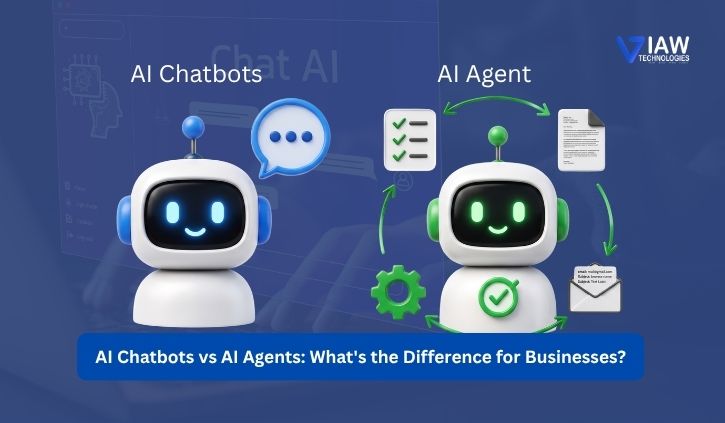
AI Chatbots vs AI Agents: What’s the Difference for Businesses?

AI is revolutionizing how companies communicate with customers, streamline their processes and take charge of repetitive processes. Some of the biggest and most commonly adapted types of AI technology are: AI chatbots AI agents Both agents and chatbots may use natural language to converse with users, but they’re utilized in very diverse contexts.

Knowing the Difference: AI Agents vs Chatbots is essential when deciding on the right AI solution to invest in for your business, as in some cases answering questions with a chatbot will suffice, while for others, an AI agent will be needed to take the conversation to the next level, as they make decisions and perform tasks, not answer questions. 

What Are AI Chatbots?

Simply put, AI chatbots are smart computers designed to talk to humans using voice or text as communication. AI chatbots work using advanced conversational AI, generative AI, and natural language processing technologies so they’d be able to comprehend human language and respond appropriately. 

Chatbots are predominantly used by businesses for customer service, lead generation, answering frequently asked questions, booking of appointments and suggesting items and offering basic technical support. 

An e-commerce store could deploy an AI chatbot on their website that fields inquiries related to stock levels, expected shipping dates, return policies and purchase order status so as to provide customers with quick support when they have queries. 

However, with their heavy reliance on conversations and response-orientated systems, most chatbots are often not agile enough for multi-step operations or requests that require high decision-making processes and interaction between many business systems. 

What Are AI Agents?

AI agents offer a step up from conventional artificial intelligence. This is where an AI agent receives an objective and is then expected to work its way toward finishing a specific goal. In the event of a task requiring a set of actions or the use of available tools, the agent can ascertain and execute accordingly to complete the desired task. Such is value to businesses that seek a step up from a conversational bot for purposes like;

The bottom line. Take, for instance, how customers seek to change an appointment with a professional. While a bot can identify the possibilities on offer, an AI bot could log into the scheduler and update an appointment by finding an alternative appointment time slot and sending the booking. In simpler terms, instead of just answering customer queries, an AI agent can action change.

AI Agents vs Chatbots: Understanding the Difference

The key difference between AI agents and chatbots is autonomy.

AI chatbots – Chatbots are computer programs that simulate the way humans use their voice to interact. AI chatbots help users answer their queries, get advice, and interact. AI Agent – An agent is defined as a piece of code. AI agents are meant to perform a task to reach a certain goal through sequential steps. 

AI ChatbotsAI Agents
Focus on conversationsFocus on goals and actions
Provide answers and assistancePerform tasks and workflows
Limited autonomyHigher level of autonomy
Best for routine interactionsBest for complex processes
Usually follow defined workflowsCan dynamically determine next steps
Limited system interactionCan integrate with multiple tools and systems

This makes the AI chatbot vs AI agent comparison more important for businesses choosing the right automation solution.

The right option depends on what a company actually wants to automate.

When Should Businesses Use AI Chatbots?

AI chatbots are an effective choice for reliable, scalable communication, customer support, and virtual assistants rather than complex task execution. 

They can be particularly useful for:

  • Answering frequently asked questions
  • Providing 24/7 customer assistance
  • Qualifying leads
  • Collecting customer information
  • Supporting basic troubleshooting
  • Handling common service requests

Businesses investing in AI chatbot development can improve response times, strengthen customer support automation, and reduce the workload on support teams.

Also, for many organisations, chatbots are an affordable way to get started with AI because you’re able to fulfil a customer use case with not that much complex integration.

When Should Businesses Use AI Agents?

AI chatbots are an effective choice for reliable, scalable communication, customer support, and virtual assistants rather than complex task execution. 

They can be particularly useful for:

  • Answering frequently asked questions
  • Providing 24/7 customer assistance
  • Qualifying leads
  • Collecting customer information
  • Supporting basic troubleshooting
  • Handling common service requests

Businesses investing in AI chatbot development can improve response times, strengthen customer support automation, and reduce the workload on support teams.
Also, for many organizations, chatbots are an affordable way to get started with AI because you’re able to fulfil a customer use case with not that much complex integration.

When Should Businesses Use AI Agents?

As businesses adopt intelligent automation, workflow automation, and autonomous AI for their operations, AI agents become more valuable. An AI agent can access CRM systems, databases, calendars, APIs, in-house software, and other business applications to perform task automation across multiple steps. 

An AI agent can, in a sales example, pinpoint a strong candidate, gather pertinent details, make a CRM note, book a meeting and inform the sales rep. These benefits of AI agents for businesses include reducing repetitive work, streamlining operations, improving productivity, and allowing employees to focus on higher-value tasks. 

Businesses that are looking to automate even more may want to try a category like ‘AI Automation Software Solutions to help integrate existing business functions and existing AI tools. 

AI Chatbot vs AI Agent: Which Is Right for Your Business?

How you pick between a chatbot or an AI bot really should begin with business outcomes. If you need help with chat or get immediate replies, a bot can support you. Lead qualification or general assistance – that is when you want an AI chatbot if we consider these needs.

AI does multi-step tasks and would support you on interactions between several other devices, producing decisions and full workflow automation. Then the agent is much more viable.

The long run isn’t restricted to merely one technological solution; AI bots with AI assistants could perform best to handle both the chat and complicated duties simultaneously. A bot’s ability would work best for initial contact, which could then escalate to an autonomous bot agent’s ability for actual reasoning capability or physical actions along the actual planet through integration to robotic systems to execute the required tasks by AI system technology. 

These types of combinations of chatbots, together with the ability to execute some genuine Earth motions by autonomous bots, will help produce quick, smart and also smooth digital experiences through AI systems.

FAQ

What is the difference between AI agents and chatbots?

AI chatbots mainly focus on conversations, answering questions, and providing information. AI agents can go further by making decisions, using tools, and completing tasks autonomously.

Are AI agents better than chatbots for businesses?

It depends on the business need. AI chatbots are ideal for customer support and routine queries, while AI agents are better for complex tasks, workflow automation, and business automation.

What can AI agents do that chatbots cannot?

AI agents can perform multi-step tasks, interact with business systems, use APIs, make decisions, and complete workflows with less human intervention. This makes AI agent development useful for advanced automation.

How much does AI agent development cost?

The cost of AI agent development depends on the project’s complexity, integrations, AI model, customization, and required features. Simple AI agents cost less, while advanced enterprise solutions require a larger investment.